
How do I purchase the products on your website?
Step 1:
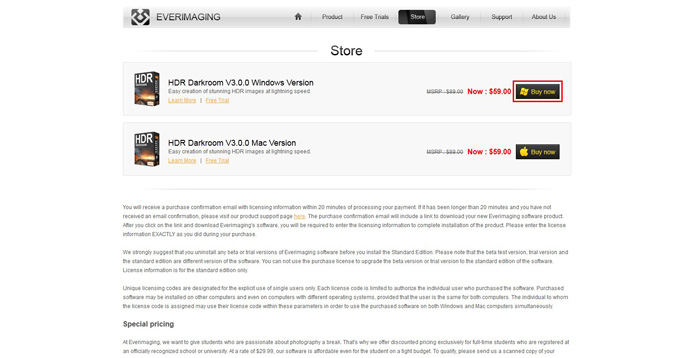
Click on the Store tab at the top of our homepage where you will find a list of our products. Select the software that you would like to purchase and click on the Buy Now button to start your order on our secure website.
Step 2:
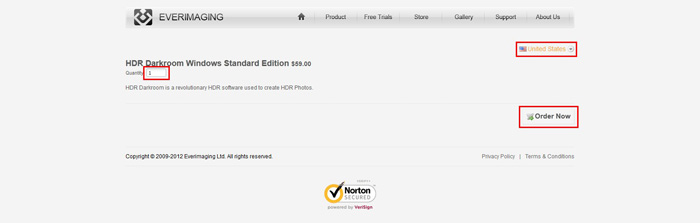
Select your country, confirm the order quantity, then click Order Now.
Step 3:
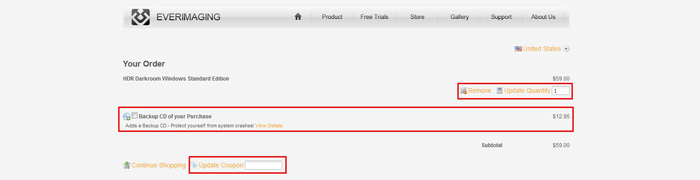
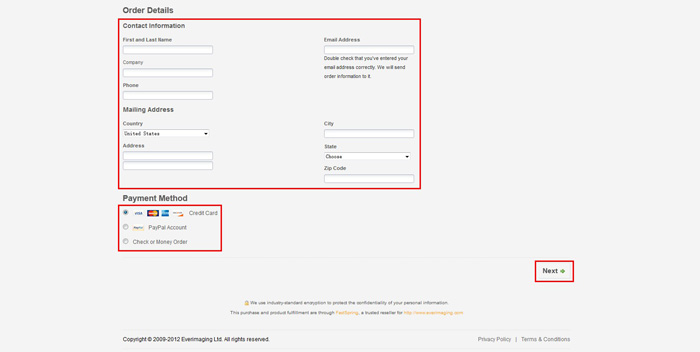
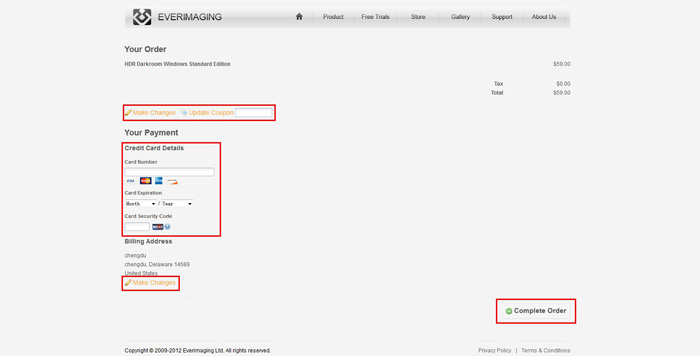
Choose if you want the backup CD of your purchase by clicking the checkbox. If you have a coupon code, enter in the blank and click Update Coupon to apply. Fill in the purchase order form with the requested information. Then, choose your payment method and provide payment information.
Step 4:
Fill in the credit card information and click the Complete Order button. You will be redirected to Paypal.com if you have chosen PayPal as your payment method. If you have chosen Check or Money Order, simply click the Complete Order button.
Step 5:
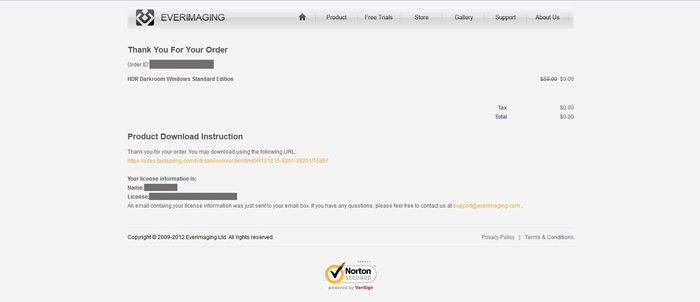
After your order has been processed, you will receive an order confirmation at the email address you provided.
Payment method We accept most major credit cards, including Visa, Master card, American Express, Discover, JCB. PayPal, bank transfers, checks, money orders, and purchase orders are also accepted. You may pay for your order using a number of international currencies. The following currencies are accepted: US Dollar, Euro, British Pound, Australian Dollar, Canadian Dollar, Yen, Swiss Franc, Danish Krone, Hong Kong Dollar, New Zealand Dollar, Singapore Dollar and Swedish Krona.
Click on the Store tab at the top of our homepage where you will find a list of our products. Select the software that you would like to purchase and click on the Buy Now button to start your order on our secure website.
Step 2:
Select your country, confirm the order quantity, then click Order Now.
Step 3:
Choose if you want the backup CD of your purchase by clicking the checkbox. If you have a coupon code, enter in the blank and click Update Coupon to apply. Fill in the purchase order form with the requested information. Then, choose your payment method and provide payment information.
Step 4:
Fill in the credit card information and click the Complete Order button. You will be redirected to Paypal.com if you have chosen PayPal as your payment method. If you have chosen Check or Money Order, simply click the Complete Order button.
Step 5:
After your order has been processed, you will receive an order confirmation at the email address you provided.
Payment method We accept most major credit cards, including Visa, Master card, American Express, Discover, JCB. PayPal, bank transfers, checks, money orders, and purchase orders are also accepted. You may pay for your order using a number of international currencies. The following currencies are accepted: US Dollar, Euro, British Pound, Australian Dollar, Canadian Dollar, Yen, Swiss Franc, Danish Krone, Hong Kong Dollar, New Zealand Dollar, Singapore Dollar and Swedish Krona.